
 Yusuf Mudagal
Updated
4 min read
Yusuf Mudagal
Updated
4 min read

Interactivity API + PWA + Capacitor
WordPress is no longer just a blogging platform or a website builder. With the evolution of block-based architecture, the introduction of the Interactivity API, and the maturity of Progressive Web App (PWA) standards, WordPress is quietly becoming a viable application platform.
When combined with Capacitor, this ecosystem enables developers to deliver a single application experience that runs as:
- A website
- An installable PWA
- And a native mobile app (Android/iOS)
, All powered by the same WordPress backend and the same frontend logic.
This approach doesn’t try to replace native development frameworks like Flutter or React Native. Instead, it introduces a practical middle ground: a unified web-first architecture that can be distributed everywhere.
Rethinking WordPress as an App Platform
Traditionally, WordPress applications were built around page loads, themes, and plugins. That model works well for websites, but it breaks down when building app-like experiences. Mobile apps require:
- State-driven UI instead of page reloads
- Fast transitions and instant updates
- Structured data flows
- Controlled routing
- Performance-optimized frontends
This is where modern WordPress components change the game.
Instead of using WordPress only as a CMS, the platform can now be used as:
- A data layer (REST APIs, custom tables, user system)
- A rendering engine (blocks + templates)
- A state-driven UI system (Interactivity API)
- And a backend for mobile delivery
This shifts WordPress from “site builder” to application runtime.
The Role of the Interactivity API
The Interactivity API introduces a state-based model directly into WordPress blocks. Rather than writing large amounts of custom JavaScript to manipulate the DOM manually, developers define:
- Shared state
- Actions
- Event handlers
- And reactive bindings
UI updates happen automatically when state changes.
This creates a component-like model inside WordPress itself. Instead of page reloads, the UI behaves like a modern frontend application:
- Lists update dynamically
- Filters react instantly
- Forms validate in real time
- Sections appear or disappear based on state
The result is an experience that feels closer to a React or Vue application, but remains fully integrated into the WordPress ecosystem.

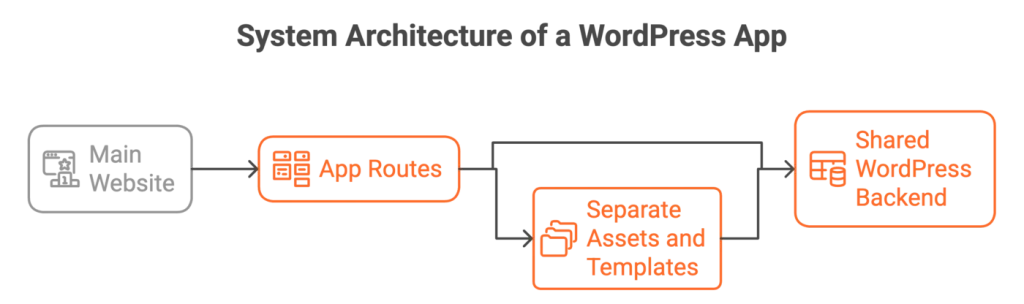
A critical architectural decision is isolation. The app experience should not inherit the heavy structure of the main website. This is achieved by creating dedicated app routes or a separate subdomain, such as:
- App.example.com
- Example.com/app/*
Only the app UI loads on these routes. No marketing pages. No Elementor assets. No heavy theme logic. No unnecessary plugins.
This separation ensures:
- Minimal asset loading
- Faster WebView performance
- Clean routing
- And predictable UI behavior
The app becomes a controlled environment, not a repurposed website.
Progressive Web App as the First App Layer
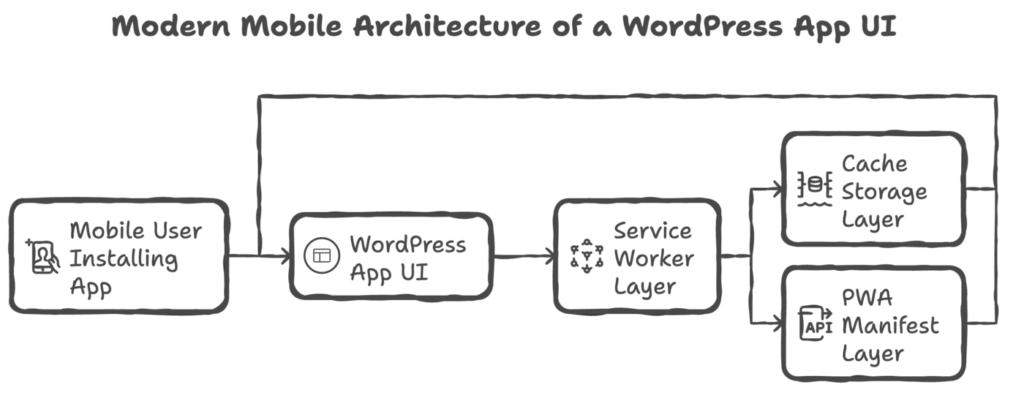
With the UI in place, the next layer is the PWA.
PWA transforms the web app into an installable experience:
- Users can add it to their home screen
- It launches like a native app
- It supports caching
- It loads faster on repeat visits
For many use cases, PWA alone is enough. It provides app-like behavior without any app store dependency. It’s also the fastest way to ship and validate an app experience.
This creates a zero-friction distribution model: users install directly from the browser.
Capacitor: Turning the Web App into Native Apps
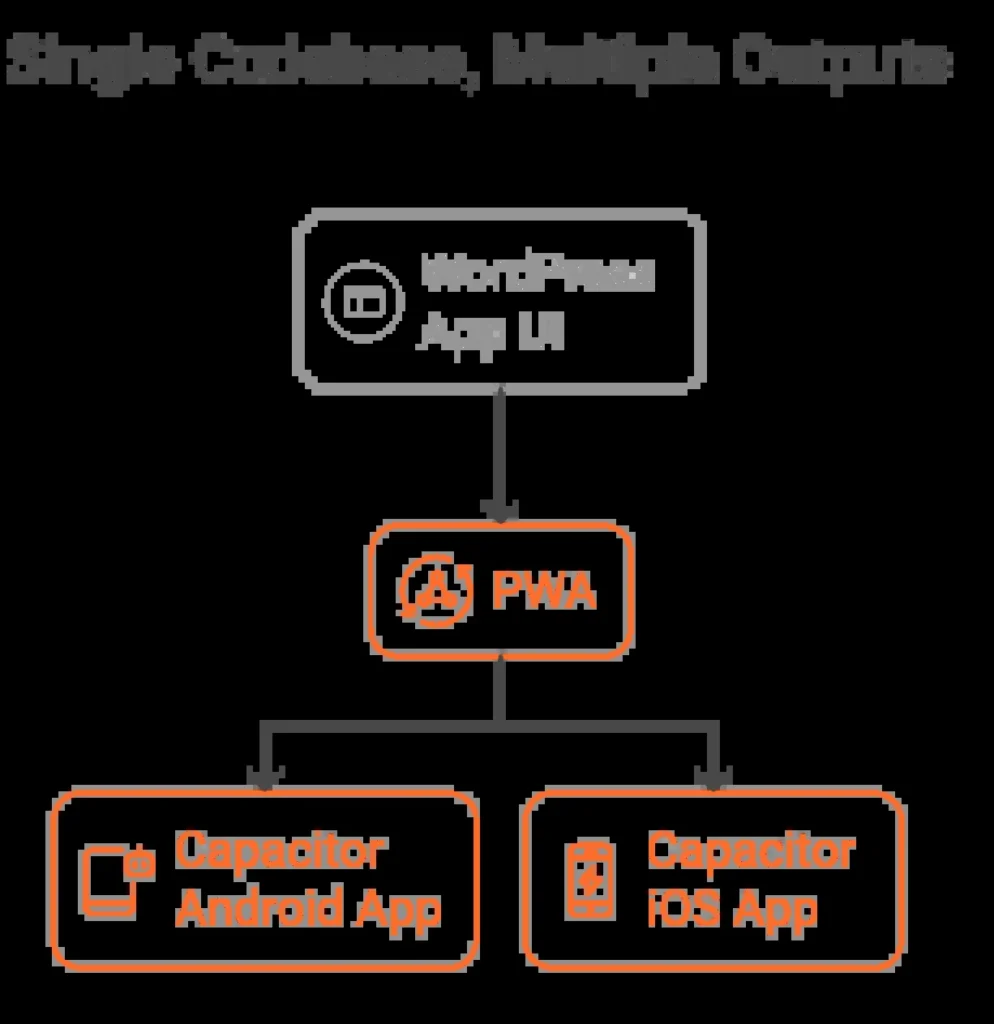
Capacitor acts as a native shell around the same web application.
It loads the app UI inside native WebViews and exposes device APIs such as:
- Push Notifications
- Camera
- File System
- Geolocation
This allows the same application to be published to:
- Google Play Store
- Apple App Store
Without rewriting the frontend or backend.
Importantly, Capacitor does not change the architecture. It simply hosts the existing app.
This creates a single-codebase model:
- One WordPress backend
- One UI
- One logic layer
- Multiple delivery channels
Data Flow and State Management
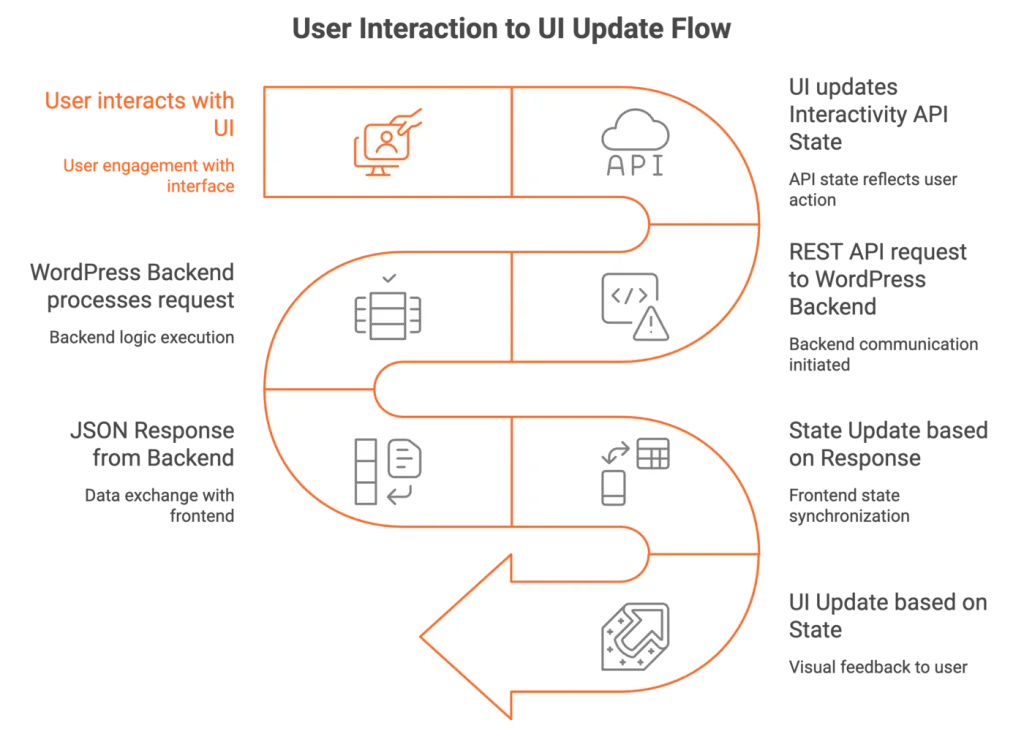
All dynamic data flows through structured APIs:
- WordPress REST API
- Custom endpoints
- Custom database tables
The interaction model becomes:
User action → state update → API call → response → state update → UI update
This removes the traditional “request page → reload page” model and replaces it with continuous state-driven interaction.
Performance as a Core Constraint
When running inside WebView environments (PWA or Capacitor), performance becomes non-negotiable.
This architecture requires:
- Lightweight block themes
- Minimal plugin usage
- Route-based asset loading
- Controlled script execution
- Caching strategies for APIs
Without performance discipline, the app will feel like a slow website inside a wrapper, which defeats the purpose.
Realistic Limitations
This architecture is powerful, but it is not universal. It is not ideal for:
- Graphics-heavy games
- AR/VR apps
- Deep offline-first systems
- High-performance real-time apps
However, it is extremely effective for:
- Booking systems
- Dashboards
- Membership portals
- Marketplaces
- Internal business apps
- Service platforms
- MVP products
Final Perspective
The combination of Interactivity API, PWA, and Capacitor does not turn WordPress into a native app framework. What it does is far more practical:
It turns WordPress into a single-platform application system.
- One backend.
- One frontend.
- One data model.
- Multiple delivery channels.
This architecture allows teams to move faster, reduce complexity, and build scalable app experiences without fragmenting their tech stack. For WordPress-based businesses, it represents a realistic and future-oriented path toward mobile-first product development.
Worth 4 minutes of someone else’s day?
Send it on. There is no share counter here to feed.
We build and look after WordPress sites.
If yours needs either, start with a conversation.